How to Trace Email Sender IP Address in Outlook? Step By Step Explained


Blog Overview: Tracing email sender’s IP address in Outlook starts with one simple step: Open message’s full Internet headers through view source in Outlook. These headers can show servers involved in delivery and, in some cases, IP address associated with mail hop. But one important detail comes first: IP you will find may not be automatically the sender’s personal or device IP.
For Faster Investigation,
- Open email header through “view message source”, find Received: entries, note relevant IP addresses.
- Check authentication results like SPF, DKIM, and DMARC.
This combination reveals more than an email IP address alone.
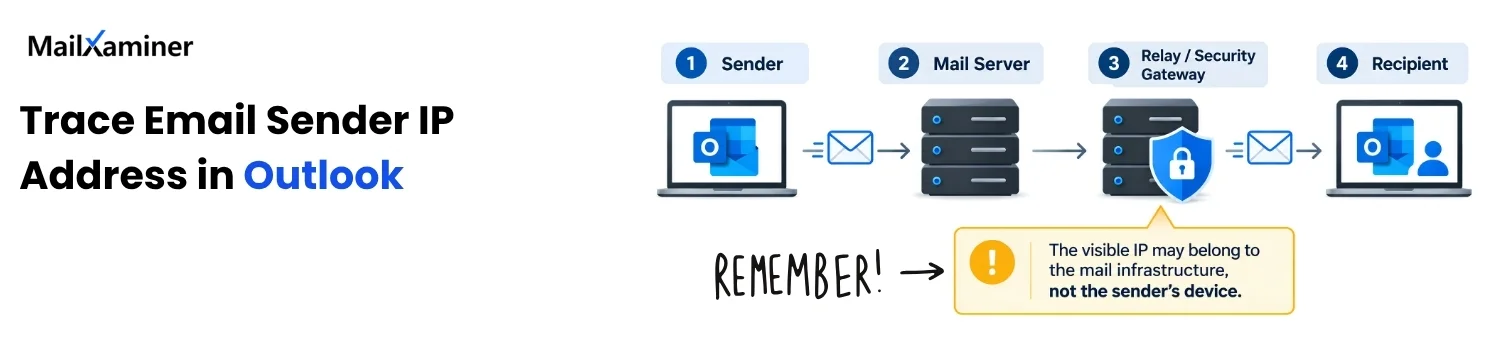
Quick answer: User can inspect an Outlook email’s internet headers for IP information, but Outlook cannot guarantee that exposed IP is sender’s personal IP. Mail systems process email messages through provider infrastructure, relays, and security gateways, so correct task is to identify which IP belongs to which hop.
Can User Trace an Email Sender’s IP in Outlook
Yes, user can trace IP address in Outlook email by examination of its Internet headers. Every email we receive has metadata about the receiver and the sender. That email metadata analysis provides routing and other valuable details about the emails. It is called an ‘email header”. Result should be treated as lead, not proof of person’s identity and physical location.
Email header have technical details about a message, including information about mail servers it passed through. Microsoft clearly tells Internet headers as a way of:
- Inspecting who sent this message.
- Software involved
- Servers that handled it.
Headers can also help uncover signs of spoofing. Many users find an email IP address, run it through lookup service, and thinks they have found the sender. This conclusion is wrong, visible IP can belong to mail server, relay, security service, VPN, or other intermediary
Note: Tracing is not same as tracking an email. Tracing means examination of message’s technical path and systems involved in delivery. Tracking refers to delivery status, opens, clicks, or other activity.
For this article, our goal is tracing origin and route information exposed by message header. Let us understand some elements of headers and what it tells us so we can understand how to find IP address from email in Outlook.
| Evidence | What it helps us understand | What it doesn’t prove |
|---|---|---|
| IP address | Shows endpoint seen during mail hop. | Person’s identity. |
| Received | Delivery path and mail-system hops | Earliest visible IP is sender’s device |
| SPF | Whether sender source is authorized for domain | Human sender is legitimate |
| DKIM | Do signed message validates against domain. | Who physically typed that message. |
| DMARC | Authentication aligns with visible domain or not. | Sender’s exact location |
How to Find and Read Outlook Email Headers
Outlook email headers can be read in New Outlook, Classic Outlook, and web browser, but clicks are different depending on version you use.
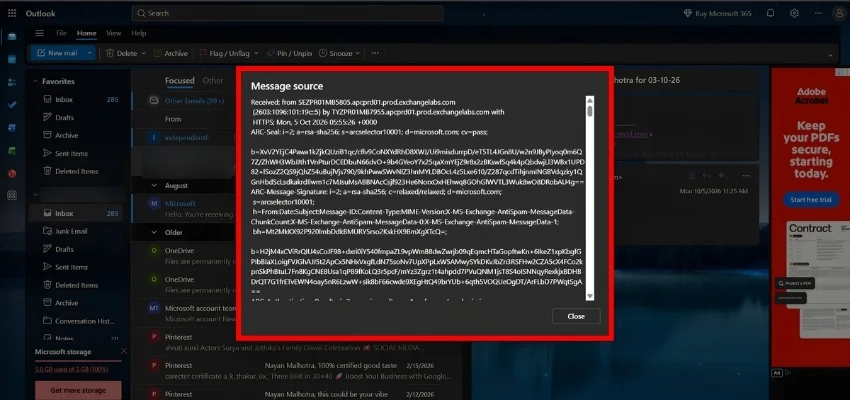
- Find Outlook email headers in New Outlook: In New Outlook.
- Open an email,
- Select More actions
- Click View
- Click View message source.
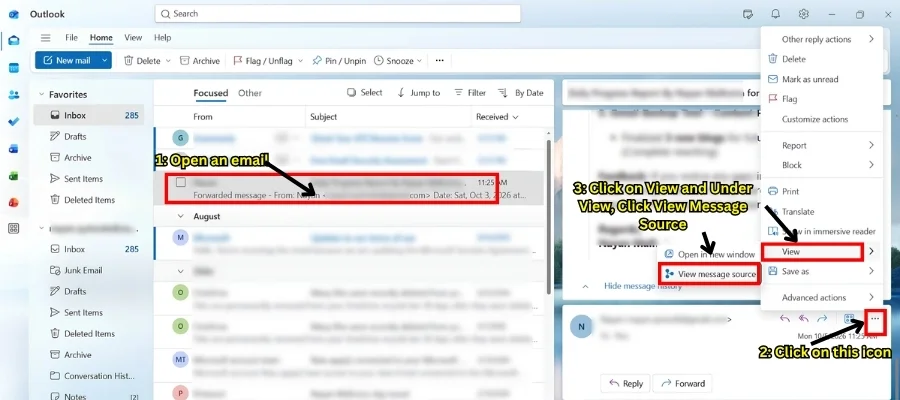
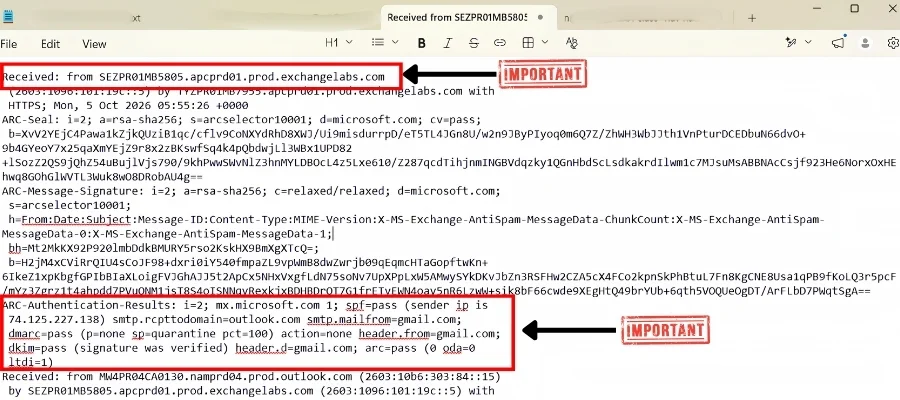
Once this is done on New Outlook, Email header will open. Copy full header into plain-text editor if you find it difficult to read on App. Then search for Received: and Authentication-Results. This gives you a cleaner working copy and makes it easier to compare multiple hops.
Trace Outlook Email Headers on The Web
Process is same:
- Open an email,
- Select More actions.
- Click View
- Select view message source.
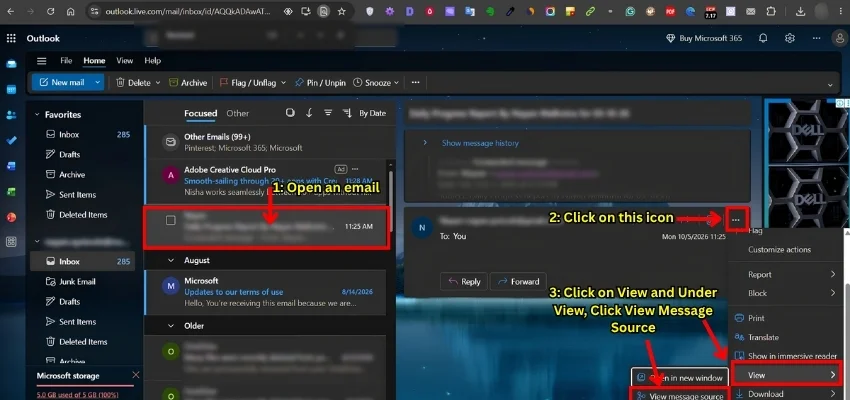
You will now get message header information you need for tracing. This takes you one step closer in how to trace email sender IP address in Outlook
How to Trace Email Sender IP Address in Outlook
To trace IP information in Outlook email, open full header and copy it in notepad on your PC. Examine Received: entries and Authentication-Results together.
Received: Entry records information about specific mail-transfer connection, while SPF result can report the IP address that was evaluated during SPF check.
- Typical Received: entry may look like this example:
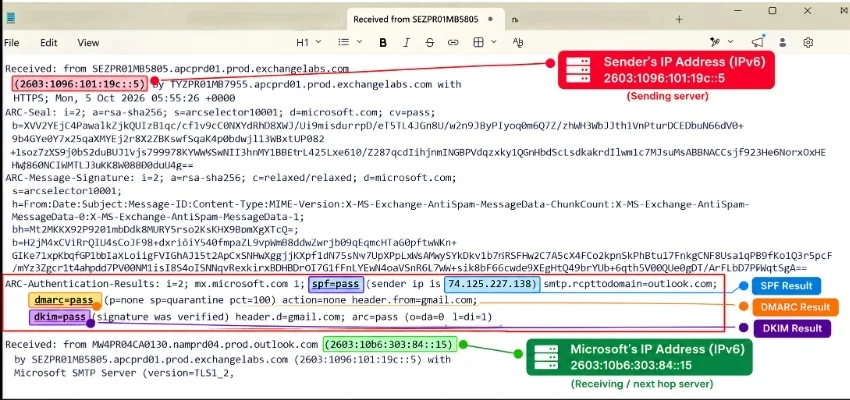
Received: from SEZPR01MB5805.apcprd01.prod.exchangelabs.com
(2603:1096:101:19c::5) by TYZPR01MB7955.apcprd01.prod.exchangelabs.com with
HTTPS; Mon, 5 Oct 2026 05:55:26 +0000
Here, 2603:1096:101:19c::5 is an IPv6 address associated with particular mail-transfer hop. The from hostname identifies system shown as the source of hop, while TYZPR01MB7955.apcprd01.prod.exchangelabs.com is server that recorded receiving the message.
Note: This IP should not be called sender’s personal or device IP. The hostnames in this example are Microsoft Exchange Online infrastructure, so this Received: entry is showing part of message’s path through Microsoft’s mail system.
with HTTPS indicates protocol recorded for this hop, and the timestamp shows when the receiving server recorded the transaction.
Check Authentication-Results
The authentication results header shows how receiving mail system checked and evaluated SPF, DKIM, and DMARC, giving you context that is beyond IP address. Simplified header Authentication results look like this:
Authentication-Results:
- spf=pass
- dkim=pass
- dmarc=pass
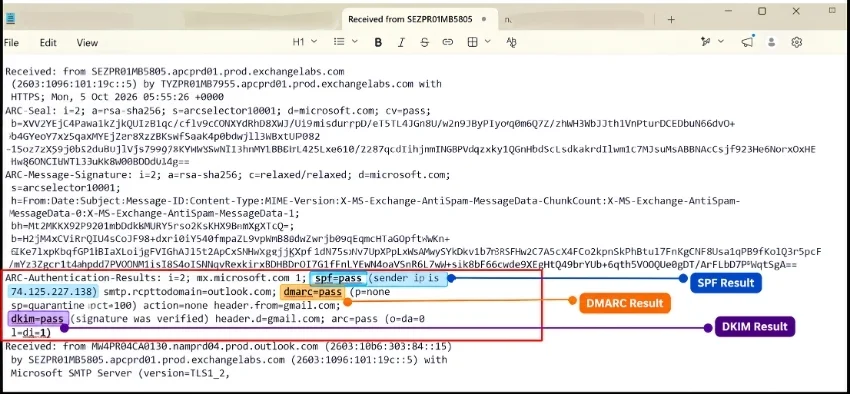
Microsoft show the IP evaluated by SPF in a form such as:
- spf=pass (sender IP is 74.125.227.138)
- smtp.mailfrom=example.com
Here, 74.125.227.138 is IP address evaluated by SPF for authentication. It should not be interpreted as the personal IP address of person who typed the message. SPF evaluates connecting IP against domain’s published authorization policy. This is why two different IP addresses can appear in an email without contradicting each other.
For example:
Received: from SEZPR01MB5805.apcprd01.prod.exchangelabs.com
(2603:1096:101:19c::5) by TYZPR01MB7955.apcprd01.prod.exchangelabs.com
with HTTPS; Mon, 5 Oct 2026 05:55:26 +0000
and:
spf=pass (sender IP is 74.125.227.138)
First address is associated with Received: hop.
Second is address SPF evaluated for authentication. They represent different pieces of evidence and should be interpreted in their own context. This is how to trace email sender IP address in Outlook.
Common Challenges in Tracing Email Sender’s IP Address
After knowing different methods to trace an email address to its owner, it is quite obvious that tracing the IP address of the sender can be a useful technique. But, it is not without its limitations. Understanding these drawbacks is crucial for a more accurate interpretation of the results.
- The email headers can be spoofed, and the IP addresses can be hidden, if someone truly wants to trick/hack you. This tactic is known as email spoofing. The outcome is obvious. The methods above have significant drawbacks, and it is not simple to investigate and track the IP address of your sender’s email address.
- The web-based email services like Gmail and Outlook.com take measures to ensure the privacy of their users by not including the IP address of the sender in emails sent out. Instead of the originating IP address, these services typically show the IP address of their mail servers instead. For instance, Gmail substitutes its generic server IP for the sender’s actual IP, so no precise location can be determined for the sender.
- In many cases, the emails are being sent from various public networks or shared environments like coffee shops, libraries, or coworking spaces. The IP address of these locations will not indicate the general location of the shared network. This limitation significantly reduces the accuracy of identifying the sender.
- Many individuals use VPNs (Virtual Private Networks) or proxies to mask their real IP addresses. When an email is sent through such services, the header will display the IP address of the VPN server or proxy rather than the sender’s actual IP address. This can further obscure the sender’s identity and location.
First and foremost, always use email tracking tools responsibly. This is especially important if you’re interested in learning how to trace email sender IP addresses in Outlook because, from a forensics perspective, tracing the IP address is the most efficient and effective approach.
The aforementioned methods are helpful to a certain level only. So, there are professional specialized email tracking tools designed to help you find the originating IP address of an email.
Try the Best Solution To Trace Email Sender’s IP Address in Outlook
When you trying to find how to find IP address from email, it is important to take effective and efficient steps. Professional email forensic software is designed in such a way that it can deeply investigate your digital footprint in multiple dimensions.
There are various manual methods that can find IP address from email, but they also come with limitations, especially when you are dealing with spoofed headers, multiple hops, or a large volume of emails. Also, it becomes very risky to upload all the crucial files to any public platform. Therefore, it is highly suggested to opt for the solution that is trusted by the digital forensics law enforcement officials as well.
Multiple File Formats Options
This email location tracker software has more than 25+ email file formats related to 80+ email clients, regardless of desktop-based or web-based email clients. So, this can give you the choice to select from different methods like cloud, image, and message and even understand how can you trace the IP address of an email in Outlook 365.

Preview Email IP Address Details
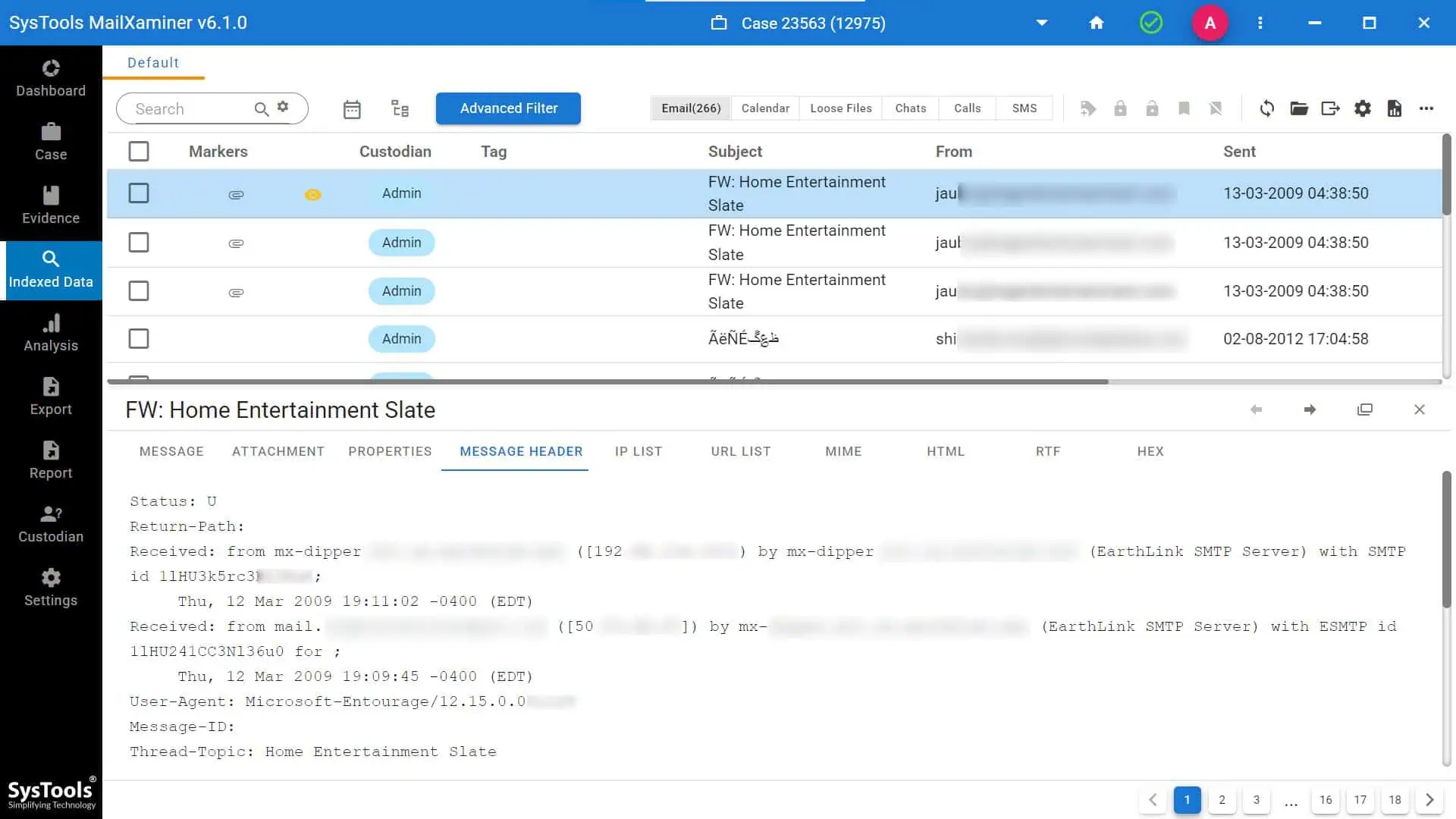
The software gives you a variety of options to analyze Outlook email details, including IP addresses. This can also provide you with the option to analyze email header, which also consists of IP addresses in multiple view modes.
As you can see in the screenshot below selected email’s complete property chart will be shown to you, including IP Addresses
 Examine Header Details to Trace Email Sender IP Address
There are various analysis options available to trace the email IP. You can check email IP address in the message header feature. These also include various other information, like:
- Received: (shows the relay path)
- X-Originating-IP / X-Remote-IP: (reveals sender’s IP)
- Return-Path: (identifies sender’s domain or mail server)
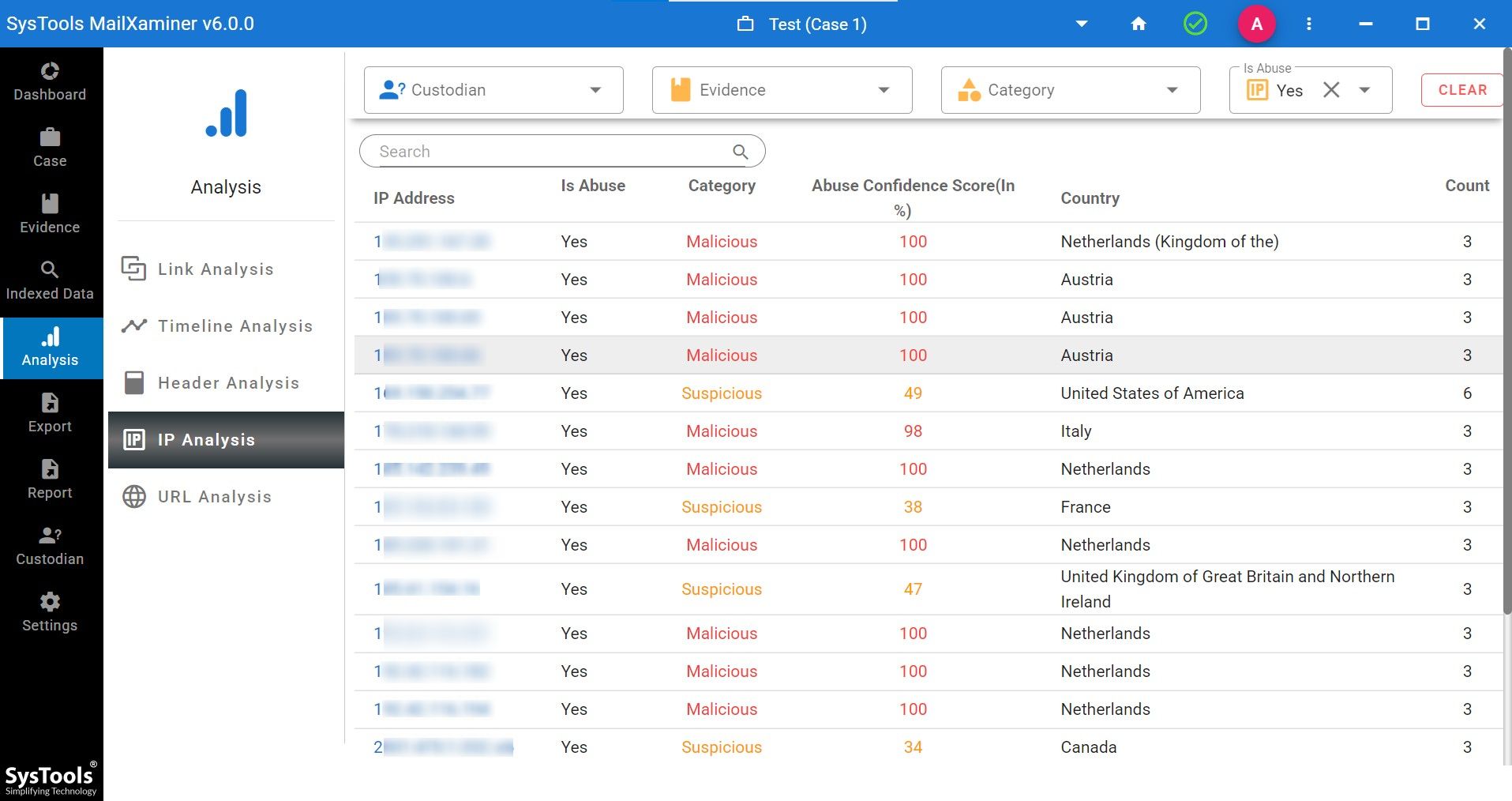
Advanced Feature of Complete Tracing of IP Details
It not only trace email address IP, but it also provides you with the details of IPs, whether they’re suspicious or highly malicious.
Multiple Export Options to Find IP Address of Email Sender
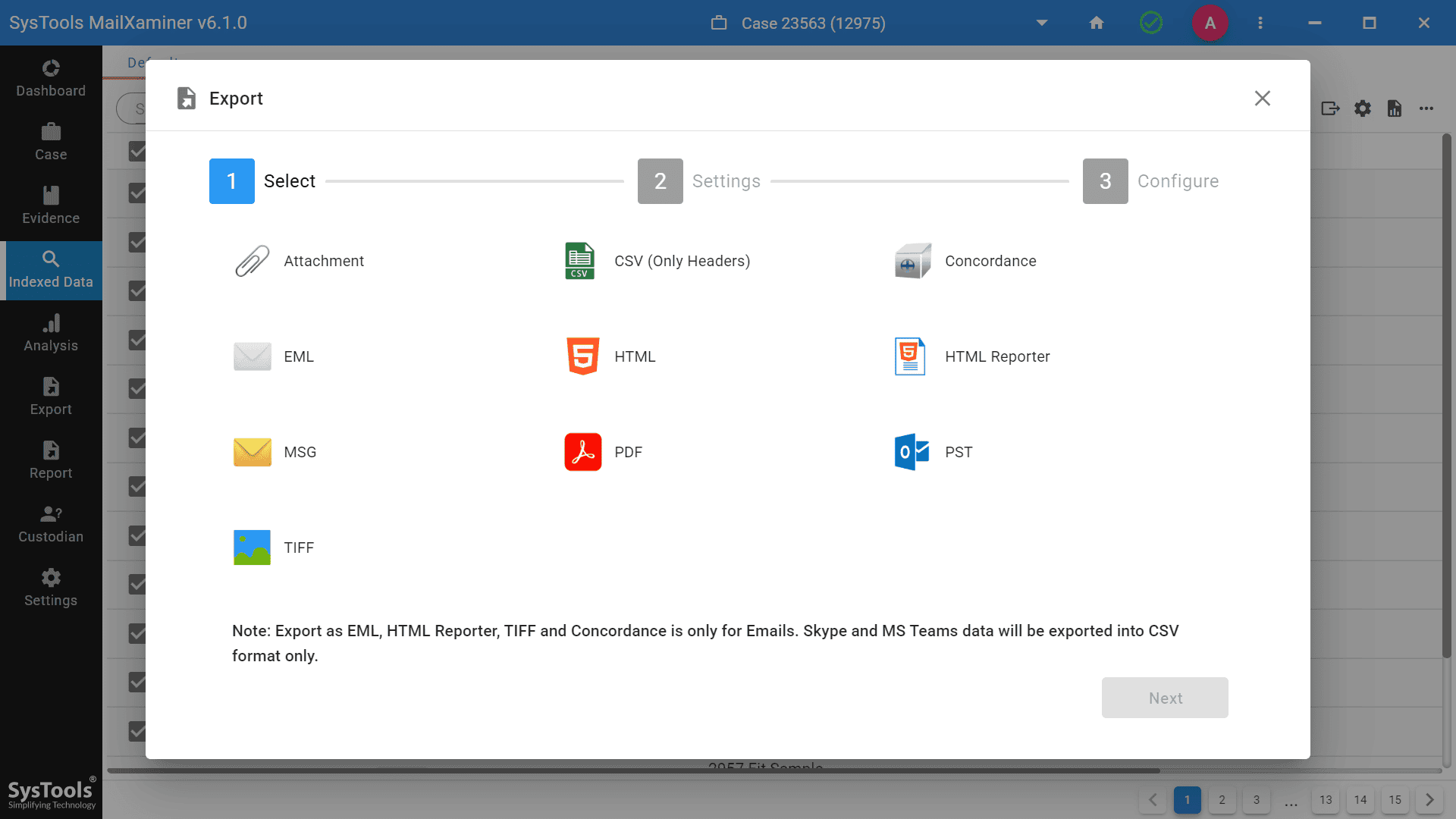
After the complete process of tracing IP addresses of emails in Outlook you will get multiple export options into different file formats.
Conclusion
Investigating and finding the email sender’s IP address in Outlook is not simple. Though the methods mentioned above are not seamless, they can help to trace server locations. But, by using a combination of professional solutions, you may be able to determine the sender’s IP address. This has a wide variety of advantageous features, like you will be able to simply search keywords in search of a file. This can help you examine the file and the email’s IP address according to your desired requirements.
So knowing how to trace IP address from email could be a very challenging and significant task. Keep in mind, professional methods are more accurate than manual methods and the IP addresses can be masked or concealed by the senders.
Frequently Asked Questions
Q. How to Trace IP Address in Outlook Desktop App?
To trace an IP address in Outlook new desktop app: Open the email, go to more icon, click view message source. Header will open and once you have email header you can check Received and Authentication results.
Q. Why Find IP Address of Email Sender?
Tracing an email sender’s IP address in Outlook helps identify spam, detect phishing attempts, and locate the sender for cybersecurity or investigative purposes.
Q. How reliable is email header information for IP tracking?
Email headers can provide the sender’s IP address, but spoofing and masking techniques can make tracking unreliable in some cases.