Types of Email Threats: Common Email Security Threats Explained


Blog Overview: Email threats are malicious and can be deceptive messages, techniques, account compromises that steal information, spread malware, cause fraud, and provide attackers access to an email account. Some attacks resembles a normal message from coworker, bank, vendor, or even someone already in existing conversation.
It is not about memorizing long list. It is about understanding what each threat tries to do, how it reaches you, what warning signs it has, and what you can do when something feels wrong.
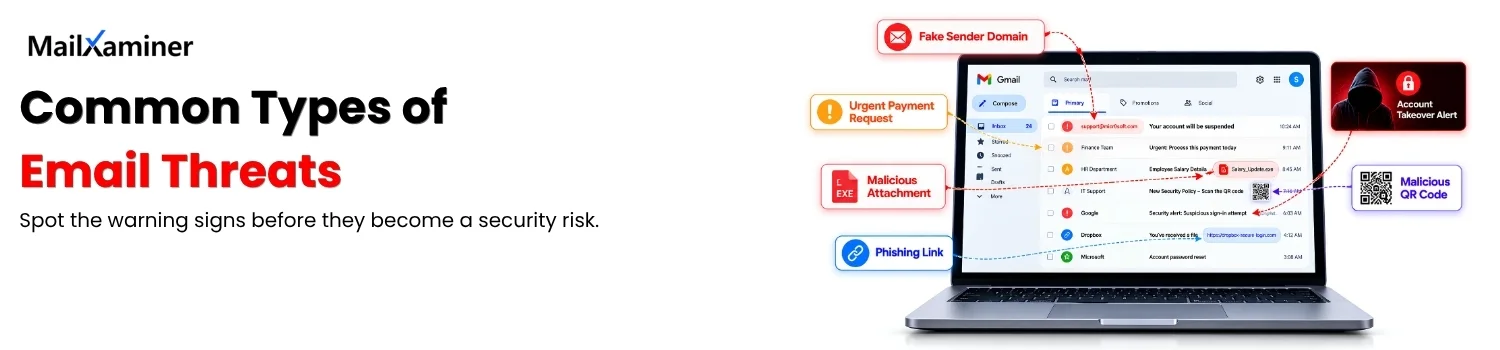
What Is an Email Threat ?
Email threat is a malicious, deceptive or unauthorized activity that is done through an email. Goal of a person executing email threat is to trick person:
- Deliver harmful content
- Gain access to a sensitive account.
- Steal data
- Any activity that will help attacker move closer to his goal.
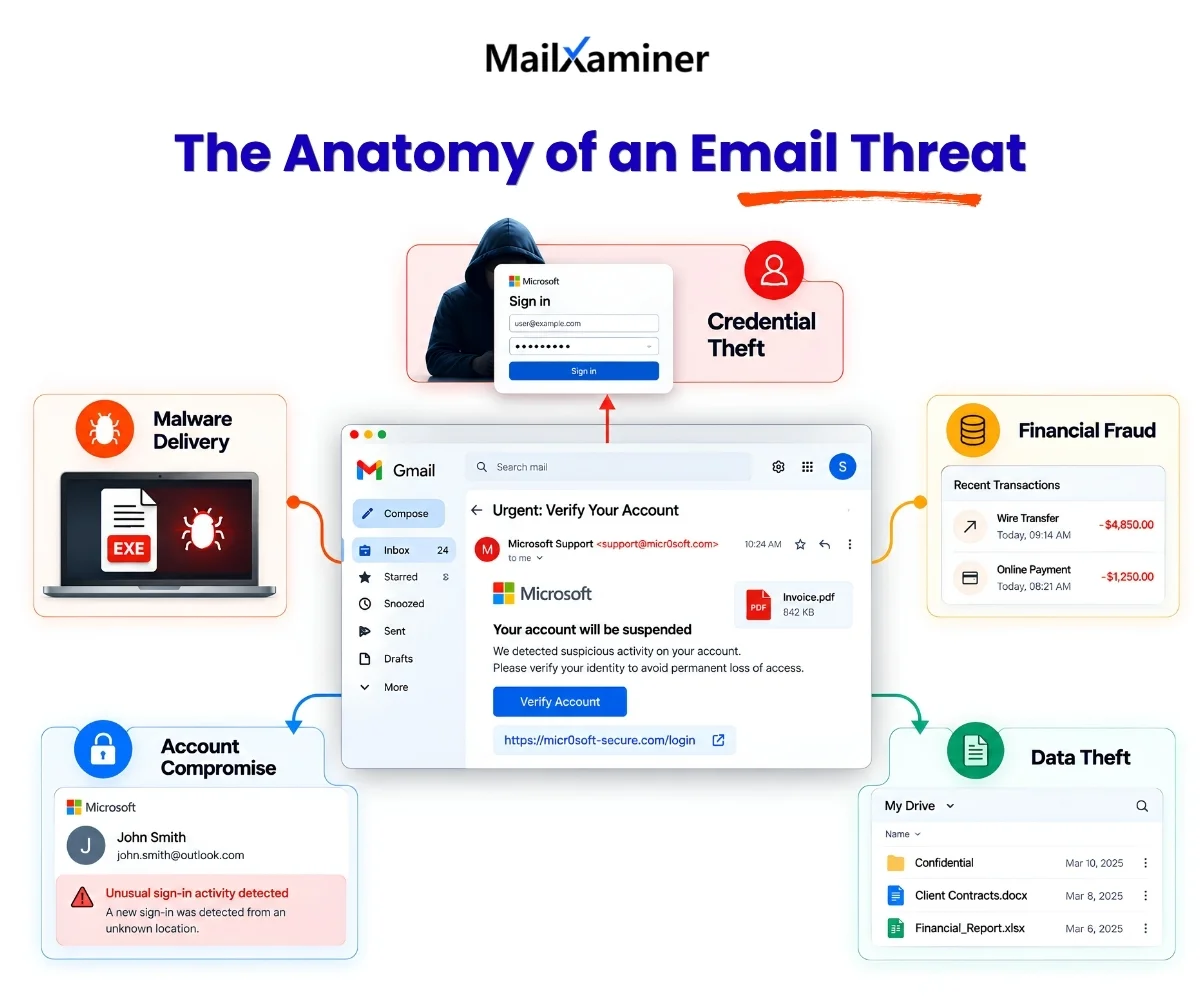
Phishing, spoofing, business email compromise and account takeover are some common examples. Not every threat works same way.
- Phishing email tries to steal a password.
- Malware attachment infect a device.
- Spoofed message imitate trusted sender.
Email that is visible on your computer screens is just one part of an attack. When you investigate sender, links, attachments, authentication results and message history it will reveal bigger story. Now lets look at the type of email threats.
Types of Email Security Threats
There is no single list of email security threats because attackers combine multiple techniques and fire them together to trick people. Microsoft groups major threats into categories such as:
- Phishing,
- Spam,
- Business email compromise,
- Malware,
- Social engineering,
- Spoofing
- Domain impersonation,
- Account takeover,
- Insider and accidental data leakage
- Data exfiltration.
Current security research and new data shows newer combinations such as QR phishing, conversation hijacking, and phishing-as-a-service. Useful way to understand this landscape is to group threats by they are trying to achieve.
| Threat Type | Main Goal | Technique |
|---|---|---|
| Phishing | Steal credentials and information | Malicious link or fake log in |
| BEC | Trick person into money or data transfer. | Impersonation and social engineering. |
| Spoofing | Make message appear trustworthy | Forged sender and lookalike domain |
| Malware | Compromise device or system | Attachment or malicious link. |
| Account takeover | Gain control of real inbox. | Stolen credentials and access token. |
| Quishing | Hide malicious destination | QR code in email or attachment. |
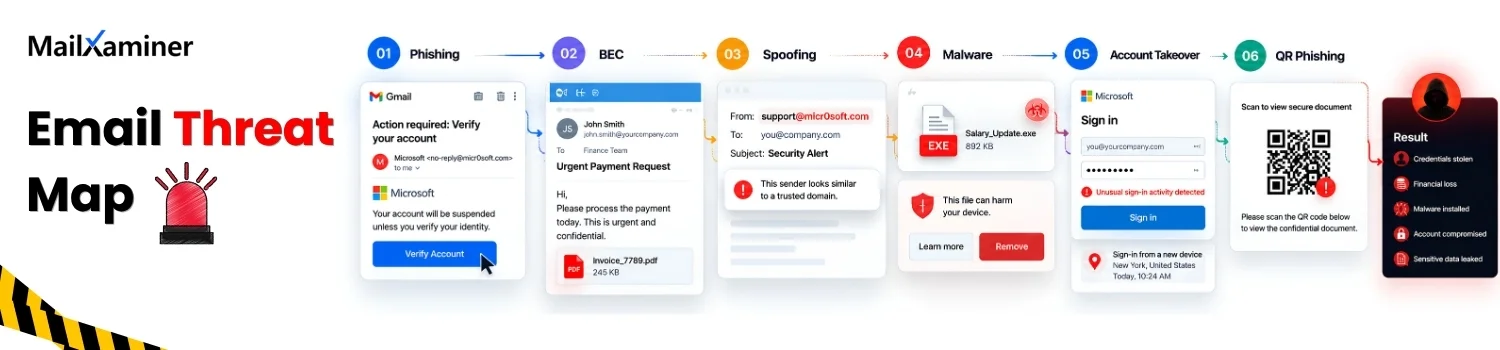
What connects these types of email threats is human decision at the center of the attack. Attacker will want you and tempt you to click, open, reply, approve, transfer, or share. Technical method changes, but pattern is same:
- Create trust,
- Create urgency,
- Reduce doubt,
- Make the next action feel normal.
Recognizing this pattern makes it easier to stop the attack before any technical damage begins.
Types of Email Threats to Know
Phishing is the broadest and most commonly used category. It uses deception to make someone click a link, open file, share information, or perform an action they would normally avoid.
Phishing: One of the most commonly occurring fraudulent act is a Phishing email attack, which is another type of email threat. In Phishing, the victim’s private and sensitive data is acquired such as personal identification, credit card numbers, account credentials and much more.
With the help of complex social engineering techniques and computer programming expertise, phishing websites attract email recipients. As a result, web users believe that the fake/spoofed website is a genuine one. In reality, the phishing victim later realizes and discovers that his/her personal identity or other important information has been stolen or leaked. This phishing threat includes extremely legitimate-looking emails such as emails from banks or reputed organizations.
The email may appear to be sent from Google or another reliable company, which will often request the user to click on the link to log in and update information. Due to the lack of knowledge, most of the people provide their personal information and get stuck in the web of fake websites. As suggested avoid phishing scams through possible defence mechanism.
Phishing email can look like and email from bank, Microsoft 365, delivery service, manager, or another familiar organization. Message received creates pressure: “Your account will be closed,” “Your payment failed,” or “Review this document now.”
Spear phishing (More Targeted Form of Phishing) : The spear phishing email attacks are highly customized and focused on a particular individual or an organization. Moreover, the cybercriminals perform extensive research to make their emails appear genuine.
For instance, the criminals will appear to be legitimate colleagues, business partner, or even superiors. An email arrives from a trustworthy source apparently, but instead, it leads the innocent recipient to a fake/bogus website full of malware. Such email based attack often use clever tactics to get the victim’s attention.
This is how spear phishing attack works. Instead of sending same message to thousands of people, attacker personalizes email around specific person, role, company, or business relationship. Extra personalized content can make message feel believable.
Whaling: Whaling is a phishing email attack that targets the organization’s biggest fish. it’s goal is to aim at executives or high-value people. In simplified words, individuals having high profiles are being targeted within an organization such as senior executives. It also includes targets such as celebrities, politicians, etc.
It is a type of social engineering scam where an attacker sends an email-based threat to someone in the organization which is capable to execute a financial transaction. The email looks as if, it is being sent by a CEO and requests an immediate financial transaction such as a direct deposit, wire transfer, vendor payment, etc.
Credential harvesting: This is close to phishing as the end goal is the same: tempting victim to enter username, password, or other sensitive authentication information into fake page. The page closely resemble like a real login screen.
Real-life example: You receive an email that says your Microsoft 365 session has expired. You click “Sign in,” see a familiar-looking login page, and enter your password. The page was fake. The attacker now has the credentials needed for the next stage of the attack.
Types of Email Attacks: BEC, Spoofing, and Impersonation
Business Email Compromise, or BEC: It is an email fraud attack where criminals impersonate or compromise trusted person to convince someone to send money, sensitive information, or another valuable asset. It involves:
- Fake executive request.
- Changed vendor payment instruction.
- Convincing follow-up to an existing business conversation.
BEC is different from ordinary spam because message is built around trust. In this attacker first study a company, learn who handles invoices, imitate supplier, and send a request that fits an expected business process.
Email spoofing is related, but it describes technique which is used to make message appear to come from someone or something else. To make BEC more clearer lets understand this from a real life example.
Real-life example: Employee in finance department receives an email that looks like from regular supplier. Sender asks for a bank account change before next payment. Nothing about writing, everything seems usual. This time the domain is slightly different. This small change is most important clue.
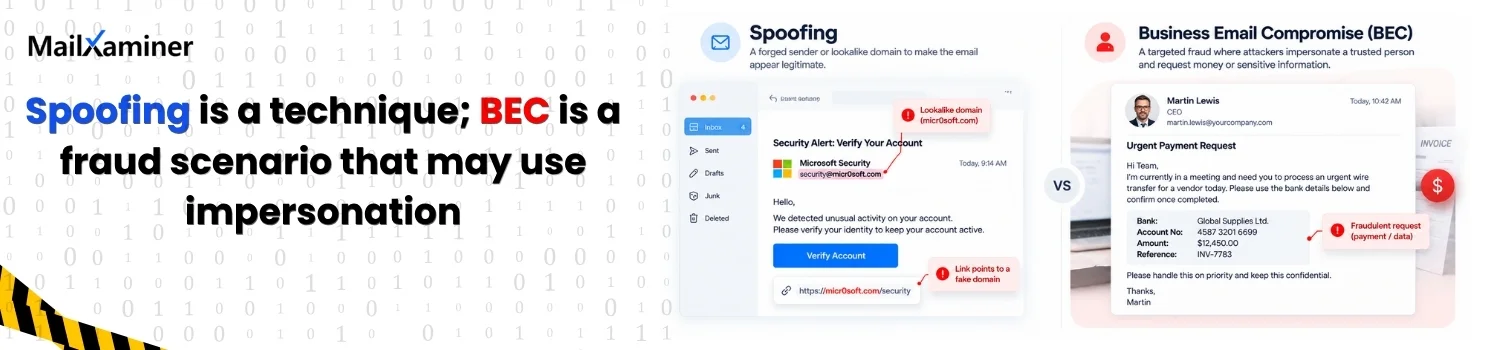
Note: Never judge business email only by display name or logo. Check the actual sender address, reply address, link destination, context, and, when needed, technical header information. If anything looks suspicious call sender and confirm you sent it or not.
These types of email threats succeed when familiar appearance is mistaken for proof of identity.
Malware, Spam, and Malicious Email Content
Malware is malicious software designed to:
- Damage systems,
- Disrupt operations,
- Steal data, or provide unauthorized access.
Emails can deliver malware via attachments, links, documents, scripts, and other content that persuades recipient to open and interact with it. Ransomware is a type of malware that encrypts files and disrupt access while attackers demand payment.
Dangerous attachment do not have to look dangerous. Attackers disguise files as invoices, resumes, shipping documents, scanned forms, or shared reports. Malicious URL can be just as effective, especially when the visible text looks normal this is the reason why it is important to check URL for malware.
Account Takeover and Modern Email Threats
Account takeover happens when attacker gains unauthorized control of legitimate email account. This changes threat because attacker is no longer sending from an obviously suspicious address. Message come from a real mailbox with a real communication history.
Account can be compromised through:
- Stolen credentials
- Session tokens
- Other forms of unauthorized access.
Once inside, an attacker can read previous conversations, send messages as account owner, create fraudulent requests, and search for sensitive information. This is the reason why an email from known colleague is not automatically safe. As person controlling the account is not real owner of that email account.
Note: Understanding these types of email threats can help user know the difference between genuine account and genuine sender.
Warning signs to look for:
- Unexpected password changes.
- Unfamiliar login activity.
- Messages you did not send.
- New forwarding rules,
- Unusual requests appearing inside normal conversations.
Conversation Hijacking
Conversation hijacking is a type of an email threat that uses existing email thread to make attack look like natural continuation of real discussion. Attacker can insert fake payment request, malicious document, or dangerous link into an ongoing conversation.
This is closely related to lateral phishing, where compromised account is used to target the owner’s contacts. Because the recipient already recognizes sender and context, message can bypass some of the skepticism applied to completely new email.
Key clue: Message fits conversation, but something about request do not fit normal behavior of the person or business.
QR Phishing
QR phishing, or quishing, is phishing that uses QR code to send recipient to a malicious website. The code can appear inside an email image or an attachment such as PDF or Microsoft 365 document. This trick works because user can’t see destination till QR code is scanned. Scan usually happens on phone, moving part of interaction away from the email security controls and workstation where original message arrived.
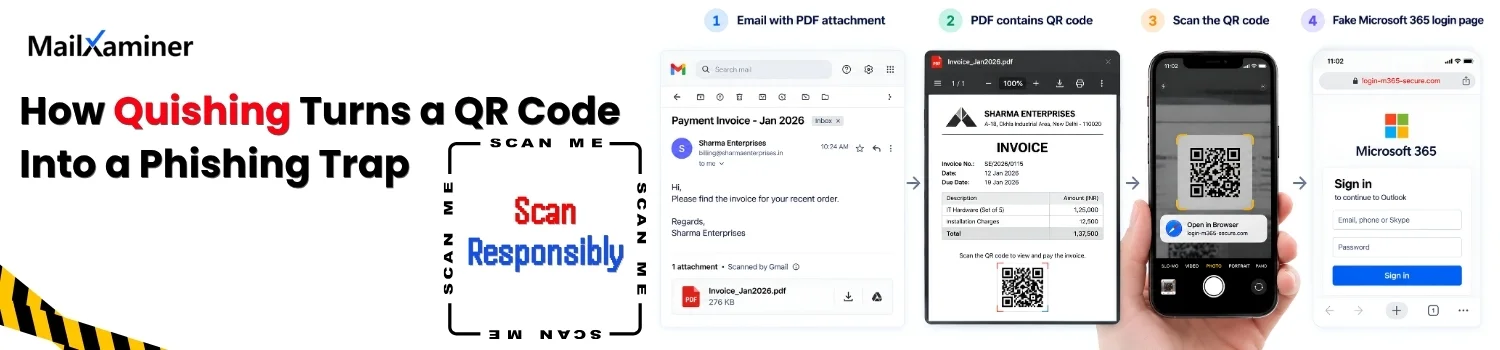
Before scanning QR code from an unexpected email, verify why it is there and where it leads. QR code is simply another way to deliver link, not proof that the message is trustworthy.
AI-Assisted and Consent Phishing
AI is changing how attackers create and personalize email threats, but AI is best understood as an accelerator of existing attacks rather than completely separate category. Current threat research points AI-driven social engineering and phishing-as-a-service as ways attackers can increase campaign volume and effectiveness.
AI can produce cleaner language, personalization, and fewer obvious warning signs. Another newer technique is OAuth consent phishing. Instead of stealing password directly, attackers now receive permission to access victim’s account and, in some cases, read or send email and access sensitive data.
Note: If you remember only one idea from these types of email threats, remember this: trust is the target. Attacker wants you to trust sender, the request, link, file, conversation, or permission screen long enough to take next step.
How to Respond When an Email Looks Suspicious
Right response is simple:
- Slow down
- Avoid interacting with message
- Preserve evidence, and verify the request through trusted path.
Start with the visible clues.
- Check actual sender address instead of just the display name.
- Hover over links without opening them and compare destination with what you expected.
- Treat unexpected attachments, urgent payment requests, login warnings, and unusual requests for sensitive data as reasons to pause.
- Never reply to the suspicious message just to ask it is genuine. If you need confirmation, use phone number, website, or chat channel you already trust.
Quick visual check should not be the only check when stakes are high. Polished logo, familiar writing style, correct company name do not prove that message is genuine. Modern types of email threats are designed to make the visible layer feel safe. When the request involves money, credentials, access, sensitive files, or unusual urgency, verification should happen outside the message itself.
What Email Forensics Can Reveal
Email forensics examines message and related evidence to understand:
- What happened
- How communication moved
- What details may support an investigation.
This matters when a suspicious email is more than one-off nuisance. Organization may need to know whether a message was spoofed, whether a mailbox was compromised.
For larger investigations, context matters as much as a single message. Looking at related communications, timelines, keywords, links, attachments, and connections between senders and recipients can help investigators understand the sequence of events instead of examining one email in isolation.
MailXaminer this is an email forensics software and it provides multiple views for email evidence, including message, properties, header, MIME, HTML, RTF, and HEX views. Its investigation features include advanced search, attachment analysis, link analysis, timeline analysis, header analysis, URL analysis, and reporting. For a suspicious-email investigation, that means an investigator can move from “This message looks suspicious” to a more structured examination of the available evidence.
Wrapping Up
For every person whether a home user or a company’s owner, security is an important concern. One must know about current email security threats that can harm the data and lead to vulnerabilities.
With this write-up, we have introduced different types of email threats which can affect the user’s data, business, or company in a harmful way. The user must know all possible email threats so that he/she can take immediate security measures without any further delay.