Lure Email: What It Is, How to Identify, Investigate and Analyze It


Quick Answer: Lure email can be seen as fraudulent or deceptive message that is designed to make people like you and me take quick action that benefits an attacker. These counterfeit emails look like an invoice, bank alert, shared document, CCTV footage. The message in creates reason to act. This reason pushes recipient toward link, attachment, reply to disclose sensitive information.
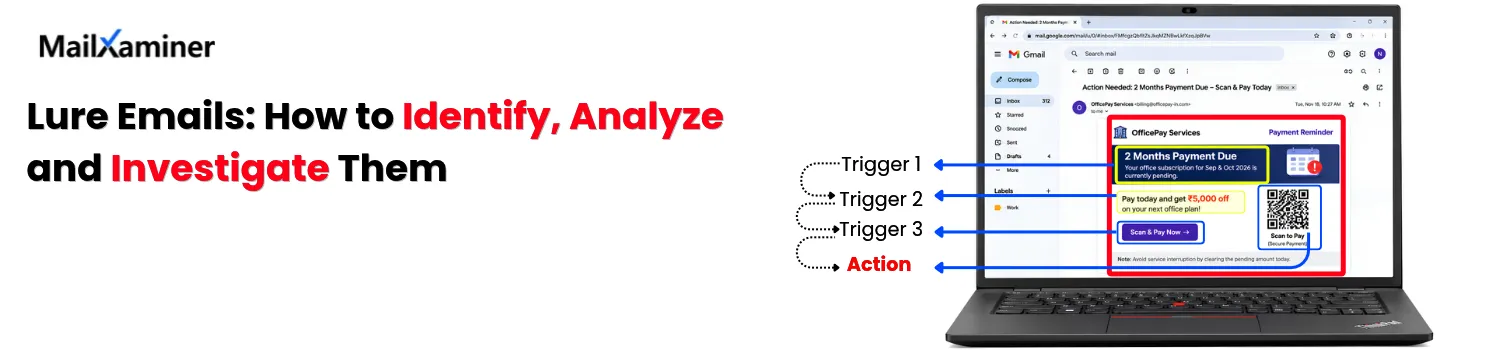
Person should always look some important points like:
- What sender wants
- Urgency nature of request
- Can I verify it independently.
In this page we will explain idea, shows common examples and outline how security teams and investigators examine suspicious messages to find related emails across mailbox.
Lure Email’s Meaning
Lure email uses realistic and believable story to make recipient feel urgency and take action. Story is bait: Requested action in that email is trigger. Action from your side can be opening that attachment, visiting login page, replying to message, scanning QR code sending money.
For example you run a small business and receives an email: Supplier invoice is overdue. Review attachment file urgently.” This message creates familiar business situation and gives you as business owner reason to act. This is a lure email as the attachment or link will lead to stolen login details, malware or payment fraud.
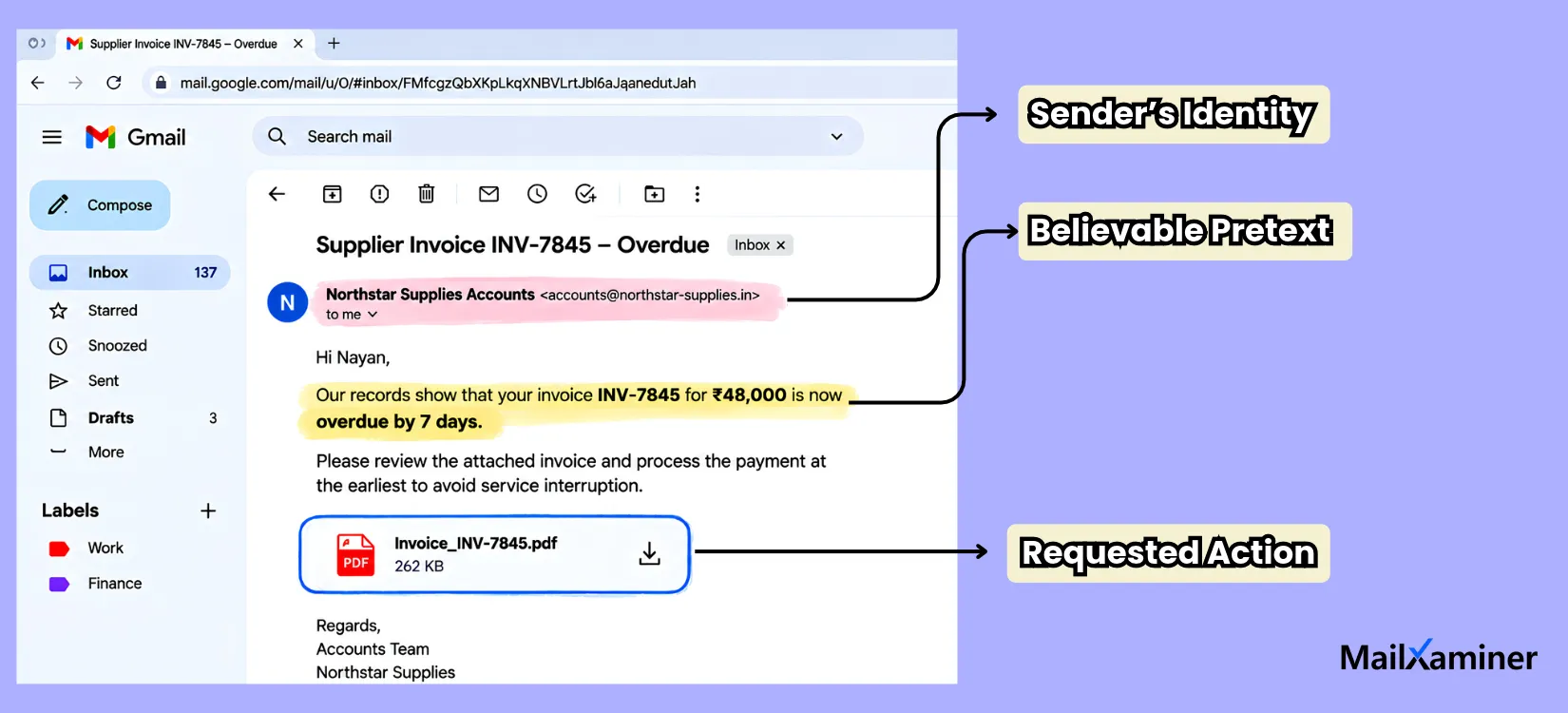
Lure do not always contain malicious file or link. Short message like “Are you available” can be a first step in conversation. This conversation will later turn into gift card or payment request. The message can be detailed or small, main goal of an email is to borrow your trust so you can click.
Lure Email, Phishing Email Lures, and Spam: Difference Between Them
These terms overlap, but they do not mean same thing. Lure is the deceptive hook that makes a person pay attention or respond. Phishing is an attack that uses deception to steal information, gain account access, or persuade someone to take a harmful action. A phishing email often contains a lure, but the lure describes the part designed to attract recipient.
These three terms overlap, it does not means they are same.
- Lure: It is deceptive hook that tempts person to pay attention or respond.
- Phishing: An attack that uses lure or deception to steal information, gain access and trigger user to take harmful action. User should identify a phishing email to remain safe. Phishing email contains lure and lure is part in that email to trigger recipient.
- Spam: It is when unwanted emails are sent in bulk. Spam can be unwanted advertising or phishing attempt. Point to note is not every spam message is phishing attack.
Way to Remember: Spam tells how message is received, phishing is an attack, Lure is a bait that is uses to engage recipient in an attack.
How Phishing Email Lures Work
Path that lure email follows: Attacker finalize a situation that recipient will recognize, writes message that perfectly fits into that situation. Once this is done attacker simply asks for an action. Action from recipient side will expose information or starts a conversation that will lead to fraud. This is social engineering: influencing other party’s decision via trust, pressure, believable story rather than depending only on technical weakness.
For more clarity on this think of fake document-sharing alert. Email arrives in your inbox that says colleague has shared file with you. Recipient selects “View document”. Recipient then reaches page that looks like a familiar sign in screen, and enters password. Attacker’s goal is now complete.
Not every lure follows same sequence, Some strategies uses QR codes, phone calls or WhatsApp reply-based conversations. MITRE ATT&CK categorizes phishing in four sub-techniques: spearphishing attachments, spearphishing links, spearphishing via services, and spearphishing voice. Its Phishing technique overview is useful technical reference.
Some Common Phishing Email Lures
As we know message that lands in recipient inbox relates to situation that makes sense to recipient. These are common examples:
| Lure Type | Email Claims | What Sender May Want |
|---|---|---|
| Invoice and Payment | Invoice is overdue | Payment and file access |
| Account and Security Alert | Sign in and account problem needs attention | Log in details |
| Mailbox Quota | Inbox is full | Credentials |
| Document sharing | Someone’s shared file | Sign in details |
| Delivery Notice | Package could not be delivered | Personal and payment information |
| Voicemail | New message is waiting | Login to fake portal |
| Executive Request | Manager needs help urgently | Reply, Gift card or transfers. |
| Business Negotiation | Buyer wants quote and order review | Attachment opening and later fraud. |
In these situations, wording change, but pattern stays familiar: Email tempts recipients and give a reason to act before checking request is genuine or not. These categories can overlap. Invoice can contain QR code, account alert can link and request MFA approval. It is always better to examine requested action.
Why Lure Emails Get People to Act
Lure works when story generated perfectly fits in recipient’s life situation. Attackers use small number of human triggers:
- Urgency: “Your bank account will be closed today.” Deadline discourages careful check.
- Authority: Message appears to come from manager, bank or service provider.
- Familiarity: Delivery update, shared file or voicemail feels like routine.
- Curiosity: Subject such as “Updated contract” “Congratulations” creates a good reason to open message.
- Fear or Loss: Email warns that money, access and important message will disappear.
You should be cautious when message appears to pressure you to take unusual action without giving you time to verify. In this situation, pause and ask: If this email do not ask me to act immediately will I still do that?” If answer is no, verify first.
How Attackers Make You Feel That Lure Emails Are Real
Attackers can make message looks tempting in more than one way. Most common method they use is display-name spoofing, this puts familiar name in sender field even when underlying address is different. Lookalike domains use very small changes, extra words and misleading subdomains to look like trusted address. Mismatched and confusing Reply-To field can send response to different mailbox.
How to Identify a Lure Email
Whenever you feel this message has luring nature. Take these following steps:
Read message properly without clicking on anything and see what it wants you to do. Is it asking for:
- Password
- Payment
- Personal Information
- Sign-in approval
- Unexpected download
- Is there any deadline or warning that something valuable will be lost.
Do cross-check that request fits conversation you are expecting or it feels unusual like:
- Supplier changing bank details
- Manager asking for gift cards
- Cloud service demanding your sign in via unfamiliar link.
Look at sender address, destination behind each link, attachment type and message context. Only single warning do not always proves email is malicious. As several small inconsistencies together form strong reason to stop and check.
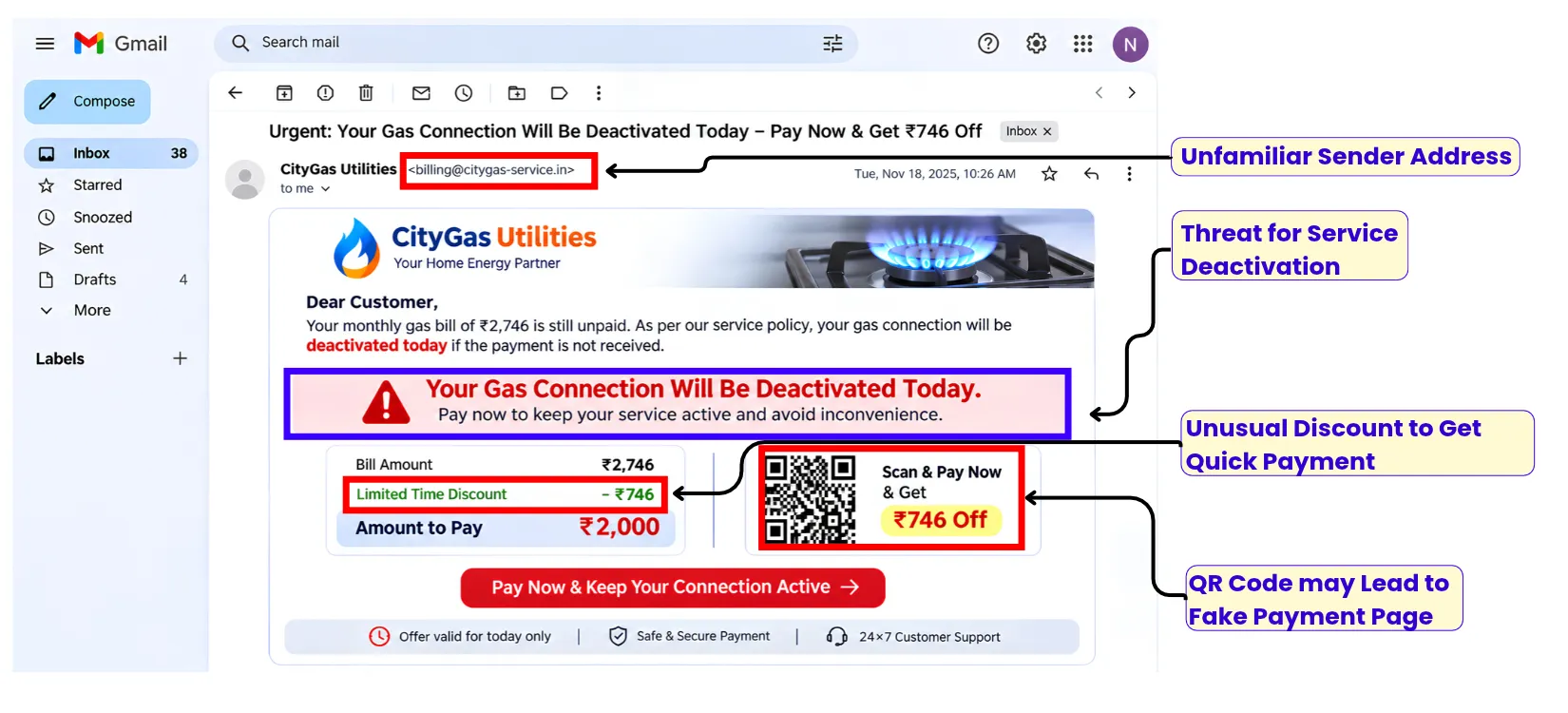
Check Sender, Domain, and Reply-To Address
You should not only rely on sender’s display name. Open message details and read full email address. Compare domain after @ symbol with organization’s known website. Watch for wordplay like added words, swapped characters and unfamiliar domain that looks similar.
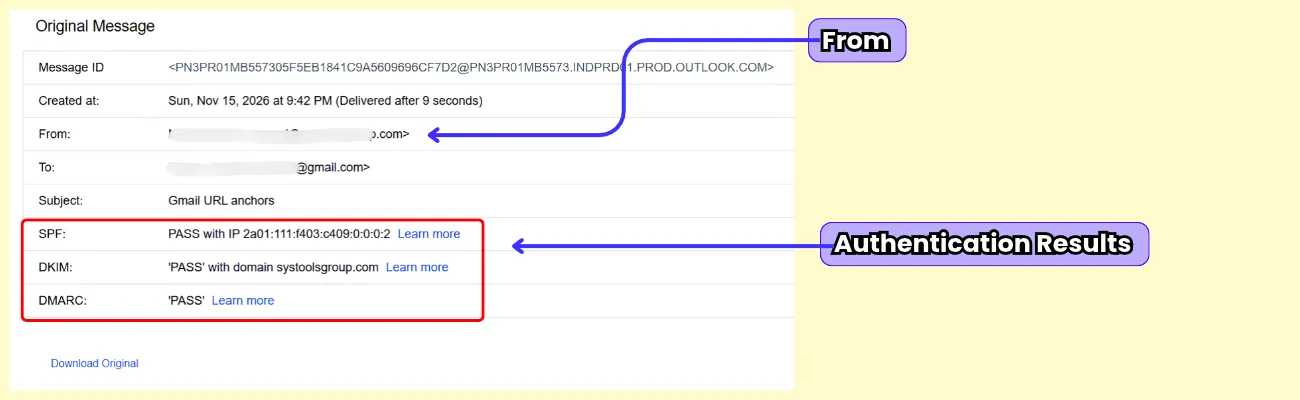
Check Reply-To field when requests demands your response. If it points to different address, ask why. Difference is not automatically malicious, some services use separate sending and reply systems. Completely different mismatch deserves attention. Gmail displays authentication information for supported messages. Google explains that user can inspect:
- Mailed by
- Signed by
- Message’s Authentication-Results header
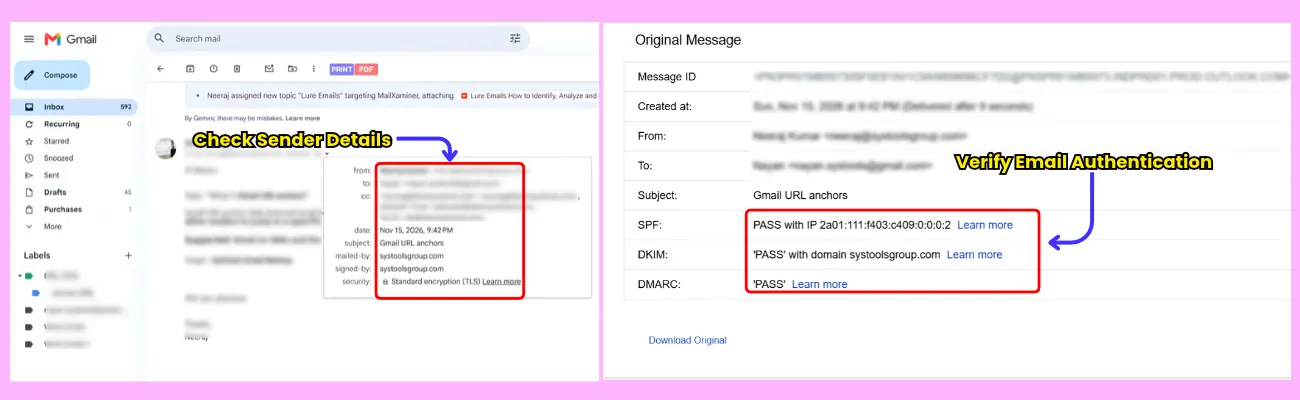
It do not mean that unauthenticated message is spam and authenticated message is genuine and safe. You should treat authentication as one signal not final verdict.
Inspect Links, Attachments, and QR Codes Safely
When thought pops up in your mind that this is lure email, inspect links, attachments and QR codes in it. For better clarity, link can display one phrase that opens different website. Hover over it to preview destination without clicking on it.
- Links: If on phone never tap on link , use mail app’s safe preview option if available, or verify service through it’s official website.
- QR Codes: Be cautious with shortened links and QR codes. QR code can hide web address in image, scanning it never makes destination trustworthy. Never enter payment details simply because page looks familiar if reached on that page via QR code.
- Attachments: File names “invoice” may not be normal invoice document. Dont enable Macros, bypass security warnings or open suspicious file to see what it contains. If you think message can affect workplace. Report it to IT or security team and let trained team examine file in controlled environment.
Verify Unexpected Requests Outside the Email
When email message tempt you and asks for money, credentials, confidential files and change in payment details. Pause and verify this using separate channel. This is to be done by visiting company’s official website yourself.
For payment changes, use real service provider’s documented approval process. For any account warning, open service provider’s official app or type known address into browser. If alert is genuine you will find this without following email’s link even. This extra and small check will take just a minute, recovering account and reversing fraudulent payment will take much longer.
What to Do If You Receive or Interact With a Lure Email
Your response will depend on what you did.
- Avoid further interaction
- Report email
- Follow right recovery step
If you have not interacted, do not reply, click, scan and download. Report it through your email client and workplace process. Delete it if policy allows. Verify it separately if it is genuine. If you got into temptation and clicked link but have not entered any information or downloaded anything.
- Close that page
- Tell your IT and security team if it is work account.
Dont just assume click caused compromise, dont ignore it either. Follow organization’s advice and watch for unusual account activity. If you entered password, payment information, multi factor authentication (MFA) code, treat information as exposed. Follow these steps immediately:
- From trusted device change affected password.
- Contact provider or your security team.
- Review account recovery and sign-in activity.
If you have approved unexpected MFA request:
- Report it immediately
If downloaded and ran suspicious file.
- Follow your company’s device-isolation procedure, this will disconnect device from network.
How to Analyze Lure Email Forensically
First step is to preserve original email, headers and attachments through this digital evidence will be preserved. Record collection time, source and handling steps. Forwarding will change message details.
Examine four parts:
- Header: In email headers, From shows claimed sender; Reply-To shows where replies go; Return-Path records return address; Received fields show mail route.
- Body: Inspect pretext, wording, images, buttons and hidden content.
- Links: Record visible text, actual URLs, and redirect paths. Dont open suspicious destinations on ordinary workstation.
- Attachments: Record file name, actual file type, size hash. Use approved and isolated procedure for examination.
Check SPF, DKIM and DMARC to investigate a suspicious email. Read them bottom-up. Trust entries that are added by known systems because earlier lines can be forged in lure email.
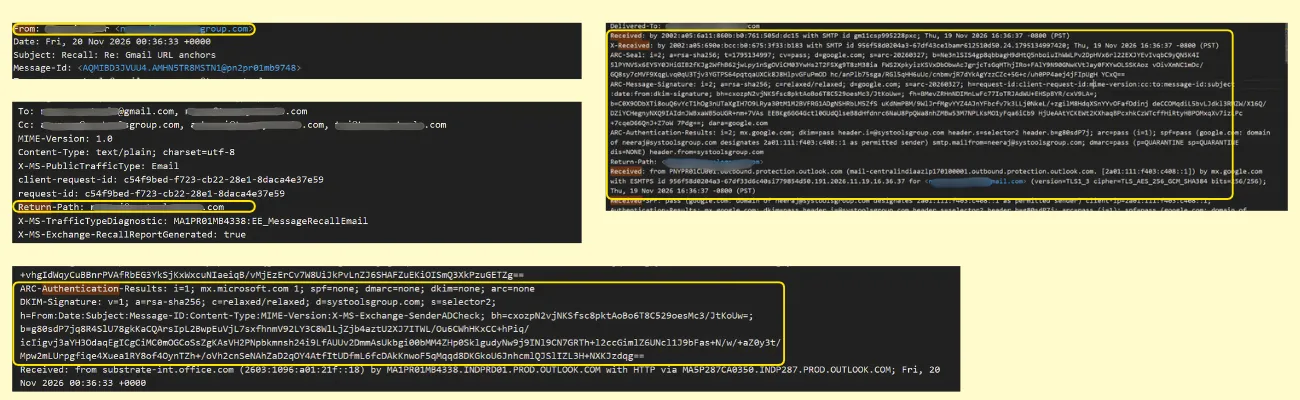
Note: No single field proves message is malicious: compare header, content and context.
Find Related Lure Emails Across Multiple Mailboxes
For finding lure emails, search relevant mailboxes for shared indicators from original message, compare recipients and activity. Campaign can reach many employees with different subjects, sender addresses, wording. Goal is to find relevant messages, identify who received them and understand what happened next
Always start with indicators from original email:
- Sender address and domain
- Subject Pattern
- Distinctive phases
- URLs
- Attachment names and file hashes
Search relevant mailbox data for each indicator and compare delivery times, recipients, replies, forwards and messages that followed first contact. Timeline helps show order of events: when first message arrived, who received it, when recipient replied, and whether follow-up payment or credential request appeared. Search results are leads and not conclusions. Review matching messages in context before declaring them part of same campaign.
Evidence in mailbox can be located in formats like PST, OST, MBOX, EML, and MSG depending on email platform and collection method. Formats available depend on evidence and tools used.
How Organizations Can Reduce Lure Email Risk
Organizations can reduce lure-email risk via combination of technical controls with clear verification and reporting procedures.
- No bank account change
- Password reset request
- Sensitive data request should be completed because an email says it’s urgent.
Use second channel and documented approval process.
Businesses should always configure SPF, DKIM, and DMARC for sending domains, apply proper mail filtering and use multi-factor authentication. Prioritize phishing resistant methods such as passkeys, security keys. Make your business report-phishing process easy to find and tell employees not to delete any message that security team needs to examine.
Company should always retain relevant mail logs and mailbox data according to policy. Information can help investigators search similar messages and determine who received them. Training should always use realistic examples and encourage people to report suspicious messages without any fear and blame. Quick report can help security team find same lure before people interact with it.
Real-World Example: Microsoft 365 Outage Lures
Microsoft documented, November 2026 campaign that used fake Microsoft 365 service-health emails as lures. On November 13, Microsoft Threat Intelligence observed phishing campaign using messages that looks similar to Microsoft 365 service-health notices. Messages claims that emails had been held during outage and would be deleted with in 24 hours unless recipients selected restore link.
Microsoft identified some randomized outage:
- Subjects
- Sender-domain patterns
- Recipient-specific tracking link
- Destination outside Microsoft.
It detected activity as credential phishing. Importantly, published evidence do not confirm that credentials were captured, malware was delivered, accounts were compromised. We can see that email can borrow real service name and believable business problem and redirect recipient somewhere else. Check service issues via official admin portal or app not via any unexpected recovery link. Read Microsoft’s campaign analysis for its findings and response guidance.
How Professional Tool Supports Email Forensic Investigations
Once identification of suspicious messages is done. Investigators have to:
- Search email evidence
- Inspect message details
- Organize findings across case
MailXaminer is an email forensics software is developed to support this kind of examination. Its features support multiple email platforms and file formats. For lure email investigation, capabilities of professional tool can help investigator to examine email activity over time. Tools like this support examination process. This do not replace investigator’s judgement or independently prove that message is malicious.
Wrapping Up
Lure email succeeds by making unusual action feel ordinary. It can look like an invoice, a security alert, or a message from someone you know. The best response is to slow down, check sender, request, and verify important actions through a separate channel.
For organizations, the work does not end when one suspicious message is reported. Finding related emails, examining headers and attachments, and building a timeline can help explain how an incident started and who may have been affected. Clear user awareness and careful email forensics work together: one helps prevent the click, and the other helps establish what happened when a message gets through.
Frequently Asked Questions
Q: Is lure email same as phishing email ?
A: Not exactly, lure is deceptive hook that encourages action. Phishing is wider attack that uses deception to seal information and gain account access. Phishing email uses lure.
Q: Can lure email contain no link or attachment ?
A: Yes, “Are you available?” can start a conversation that turns into payment or gift-card fraud. Lure is opening hook, not a file or link.
Q: What should I do if I clicked suspicious link ?
A: Close page immediately and do not enter any sensitive information. Report work message to IT. If you submitted password or payment details, contact provider, change password from trusted device and review account activity.